Screen Snap Shots
|
|
|
|
Inventory Control and Manufacturing Software
100 % Picture and Barcode Driven
|
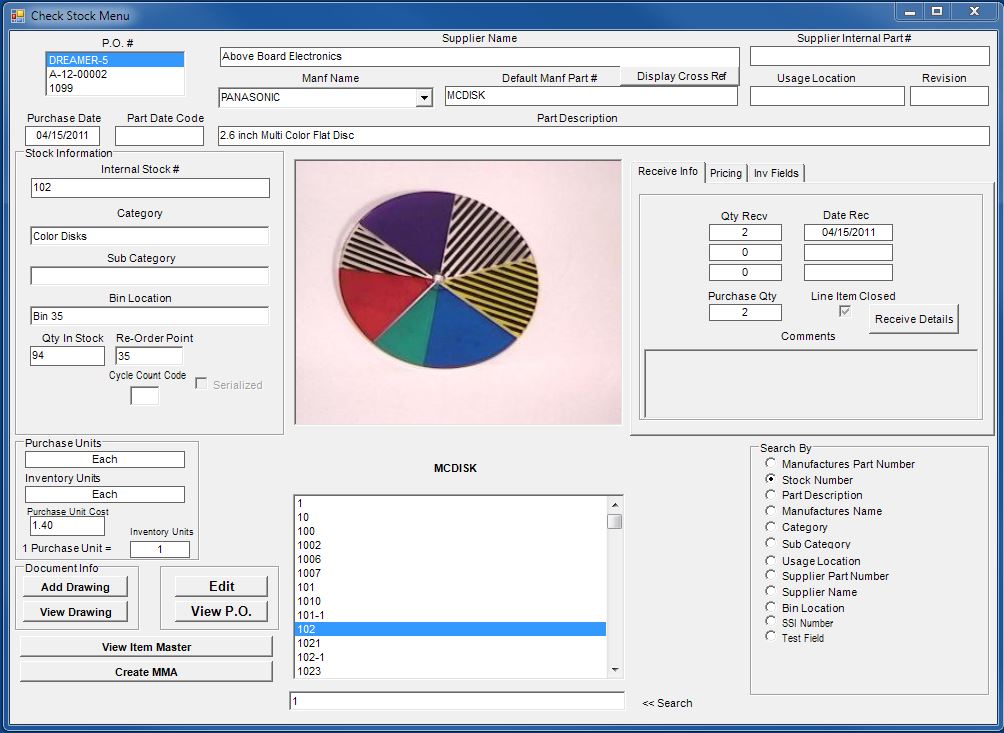
Visual Inventory Control is a powerful and yet still simple to use Inventory Control Software.
It features a user friendly barcode requisition module that supports several types of barcode readers.
This Software can be used either as a simple inventory Control Software or a complete ERP manufacturing solution.
The unique picture driven aspect allows this software to be used with several different types of inventories.
Including Electronic , Mechanical , Clothing , Food , Aeronautical, Medical and Hotel Maintenance Inventory Items.
Barcode Requisition Barcode Readers Picture Driven Different Inventory
|
 |
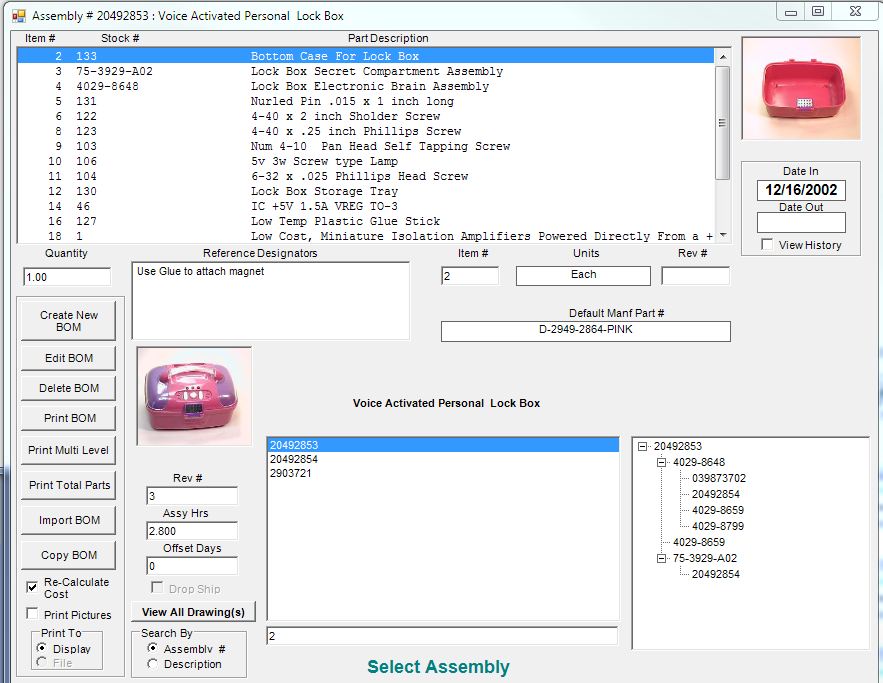
You will Never find a more Intuitive Bill of Material Maintenance Screen anywhere.
|
|
|
There are an abundant amount of Inventory Control Software packages available on the market.
Some more complicated than others and most do not cater to the simple user.
This causes frustration and eventually Inventory Control Failure.
(If it is NOT easy to use then nobody will use it.)
This software was developed to bridge the gap between the real complex systems and the generic systems |

|
|
|

Try The Web Version
of this screen
no password required
|
 |
Advanced Features Include
|
|
Support for Wireless, Serial and Wedge type Barcode Readers |
|
|
User Friendly Barcode Requisition Control Screen |
|
|
100% Picture Driven (All Screens will Display a Picture) |
|
|
Powerful Inventory Lookup Screen |
|
|
Prints Stock Labels to a Zebra Barcode or Standard Printer |
|
|
Auto Create all Purchase Orders for Top Level Assembly |
|
|
Create a Backorder for an Inventory Item |
|
|
Database can be placed on a network to support multi-users |
|
|
Engineering Change Order Screen for Revision Control |
|
|
Automatic Tax Calculation for each Supplier |
|
|
|
What sets this Inventory Control Software above the rest is the Picture Driven Aspect.
The software will display a picture of the part in every screen for rapid picture scroll.
Couple this with an extremely powerful stock lookup screen and the software becomes
a strong company resource that is hard to beat.
This allows users to find the correct stock part in the shortest amount of time with the least amount of information. |
|
|
Once your engineering department sees this |
|
|
manufacturing software in action you will look no further. |
|
|
It makes creating a Bill of Materials
|
|
|
twice as fast with half the effort.
|
|
Software Features :
Detailed Purchase Order history report with output to Screen , Printer or Excel File
Optional Speed Purchase Screen with Web driven UPC Barcode Lookup
Create a Request for Quote (RFQ) and with one button, process it to a Purchase Order.
Create a Proposal and with one button, process it to a Sales Order.
NEW! Configurable E-Commerce Shopping Cart Add-On Try It. Learn More
Create a Build Order against any Assembly and the Software will Generate all the Purchase Orders.
Email Purchase Orders directly to suppliers.
A Brief History:
|
|
Visual Inventory Control Software was developed originally as a simple inventory software. As time went on and it's popularity grew , the actual customers had a large part in the system design. Purchasing departments were requesting detailed shipping information, including default Terms, Ship Via , Shipping Account numbers Vendor Tax calculation and Direct Vendor Email. This was the first step to bringing this Inventory management software to the top. We also worked with the stockroom personal to identify what they needed for a simple Inventory Software. This included barcode labels with pictures that will support several types of barcode scanners and a powerful wireless requisition software screen. We worked closely with the engineering department who requested the strongest part of this manufacturing Software. They needed to find the correct inventory part with the least amount of information to create multi-level bill of materials. The stock scan screen was built to accommodate their needs. It includes an nine-method inventory search engine allowing the user to search by stock number , manufacturing part number , category , supplier / vendor name and a unique part name search capability. With the power of this screen alone , the company saved thousands of dollars in engineering costs. What really made this Inventory control software all come together were the part pictures. The purchasing department can use the pictures to visually describe the part to different vendors for second sourcing. The Stockroom personal use the pictures for verifying the correct part is received , placed in the proper inventory bin and issued to the manufacturing floor. Once again the engineering department just loved the pictures because it shows them if they have really found the part that they wanted regardless what the description said. Several new features have been requested by our current and new customers. Each customer's request continues to enhance the software and has brought this Barcode Inventory Software to the top. One of the major new additions was the ability to link the drawing and document specification of the parts and assemblies to the ERP system. With Combination of the Bill of Material Management , Planning / Forecasting , Work Order Processing , Work Order Traveler and Engineering Change Order the system becomes a full Manufacturing Software ERP Solution. Multiple warehouse inventory support has also been added, enabling a user to create a single purchase order and receive it into several warehouses. Along with this addition it was necessary to create an extremely detailed purchase order history report. After this report became available other customers requested an Inventory Item history which displays all activity of a single part including Purchase , Sales , Requisition , Work Order and Inventory Adjustments. An optional web driven Inventory shopping cart is also available. This allows users to log into a web shopping cart and browse the inventory. The web user can add items to their cart then complete the order by checking out. This will create a pending order in the software.The order can then be processed to a sales order and a kit list may be printed.The advantage of a Web Shopping Cart is that the users do not need the inventory software installed on their computer. This Software continues to be enhanced through requests of current and new customers. |
Manufacturing software - inventory software - Inventory control software - Bill of Materials software Site Map
|